Sibling Discount for School Fees: How to Set It Up
Many schools reward loyal families: when a parent has several children enrolled, the fees come down. It is fair and popular — but done by hand it is a source of arguments and mistakes. Here is how to design the rule, and how to set it up in MSMS in a minute.
Decide the rule first
Three choices define any sibling discount:
- When it starts. "More than 2 children" means a family needs 3 or more children in the school. Some schools start at 2.
- Who receives it. Either every child in the family once the family qualifies, or only the child that pushes the family over the line — for example the 3rd child, the 4th and so on.
- The size. A percentage (10% off) or a flat amount (GH₵300 off the term).
Worked examples
| Rule | Family of 3, fees 1,000 each | Total |
|---|---|---|
| 10% for every child, from 3 children | 900 + 900 + 900 | 2,700 |
| 10% only for the 3rd child onward | 1,000 + 1,000 + 900 | 2,900 |
| Flat 150 off, 3rd child onward | 1,000 + 1,000 + 850 | 2,850 |
Set it up in MSMS
- Add each student with their parent on the student form. MSMS links brothers and sisters through the parent's email or phone number — that is how it knows who is in the same family.
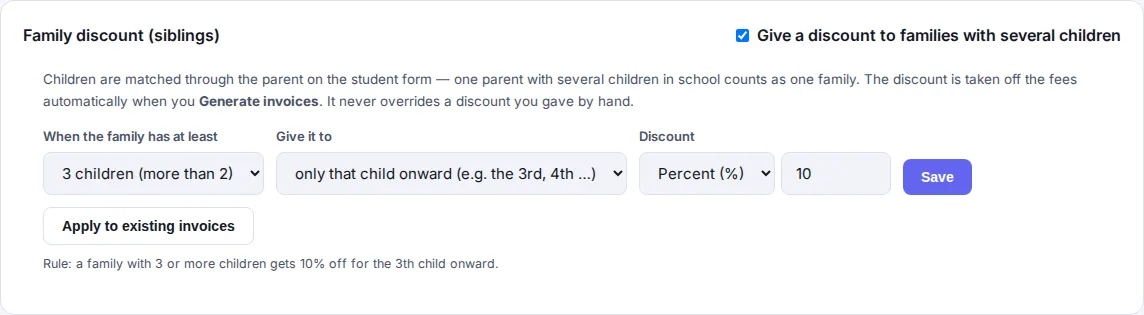
- Open Fee Structure and find the Family discount (siblings) card. Switch it on, choose how many children make a family, who receives the discount, and the percentage or flat amount.
- Press Generate invoices. The discount is taken off automatically and every invoice shows the original price, the discount and the reason.
- Already generated invoices? Save the rule, then press Apply to existing invoices to recalculate the term's unpaid and part-paid invoices.
What MSMS protects for you
- A discount you gave by hand (a scholarship, say) is never overwritten.
- Invoices that are fully paid are not touched, and a discount never goes below what the parent has already paid.
- If a sibling leaves or you switch the rule off, the automatic discount is removed again.
- Flat amounts are spread across the child's fee items, so the total off is exactly the amount you set.
Parents see the original price, the discount and its reason on their Fee Status page, so there are no surprises. See the whole flow in How MSMS works.
Quick answers
What counts as a family in MSMS?
Active students who share a parent — linked through the parent's email or phone number on the student form.
Can I give the discount to only the third child?
Yes. Choose 'only that child onward' and set the family size to 3. Children are counted in the order they were enrolled.
Is the sibling discount flat or percent?
Both are available. Choose Percent or Flat amount on the Family discount card.
